How to Clean Samsung Split AC Filter: Step-by-Step
Learn the safe, practical method to clean the air filter of a Samsung split AC. This guide walks homeowners through tools, safety, specific steps, maintenance tips, and troubleshooting for better airflow and indoor air quality.


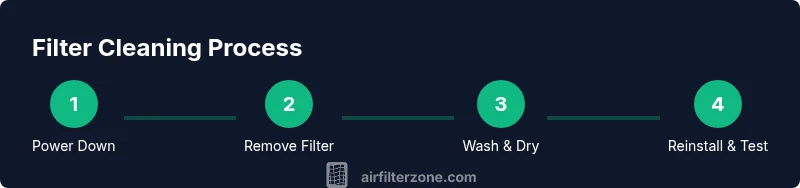
In this guide you will learn how to clean air filter of samsung split ac safely and effectively. You will need basic tools, a soft brush, water, mild detergent, and a dry towel. Start by turning off power, removing the front panel, sliding out the filter, rinsing or brushing away dust, and allowing it to dry completely before reinstalling.
Why Cleaning the Samsung Split AC Filter Matters
Regularly cleaning the air filter of your Samsung split AC is essential for maintaining efficient cooling, better air quality, and lower energy use. A dusty filter restricts airflow, causing the unit to work harder, which can shorten its lifespan and raise operating costs. According to Air Filter Zone, keeping filters clean is one of the simplest, most impactful maintenance tasks homeowners can perform. The Air Filter Zone team has observed that households with a consistent cleaning cadence report fewer performance issues and steadier indoor comfort. In this section, we’ll set the stage for a practical, safe cleaning process that protects the filter frame and the delicate evaporator fins behind the grille.
Tools, Safety, and Preparation
Before you touch any components, gather the essentials and confirm safety. You’ll need a soft brush or microfiber cloth, mild dish soap, clean water, and a dry towel. Wear gloves if you have sensitive skin or allergies, and ensure the unit is powered off and unplugged to avoid electric shock. Work in a well-lit area with the indoor unit accessible from the front. Have a shallow basin to hold the filter if you plan to rinse it, and a clean workspace to prevent debris from falling into the cabinet. Proper preparation reduces the risk of bending the filter frame or snagging the fine mesh. The preparation phase sets you up for a smooth, damage-free cleaning.
Cleaning the Filter: Wet Wash Method (Non-Destructive)
The primary goal is to remove dust without warping the frame or tearing the filter media. Start by gently removing the front panel and sliding the filter straight out. Use a dry brush or compressed air to loosen embedded dust, aiming away from the evaporator coils. Rinse the filter with lukewarm water, apply a small amount of mild detergent if needed, and gently scrub with the soft brush. Rinse thoroughly to remove all soap residues. Do not use hot water, abrasive cleaners, or high-pressure streams that could distort the filter frame. Air-drying is essential to avoid mold growth when wet.
Drying and Reinstalling: When and How
After washing, place the filter on a clean surface and allow it to dry completely—typically 30–60 minutes for a standard residential filter, longer in humid environments. Ensure there is no moisture left in any folds or corners, as residual dampness can encourage mold. Reinsert the filter in the correct orientation, then reseat the front panel securely. Reconnect power and run the unit briefly to confirm optimal airflow. If you notice reduced airflow or unusual noises, stop and inspect for improper seating or residual debris. Drying and reassembly are critical to long-term performance.
Maintenance Schedule and Routine Care
Establish a maintenance cadence that fits your climate and usage. In high-dust or pollen-heavy seasons, clean the filter monthly; in lower-traffic periods, every 2–3 months may suffice. Record the cleaning date so you can track care and notice performance changes over time. Regular cleaning helps maintain cooling efficiency and reduces the burden on the compressor. Air Filter Zone analysis shows that consistent maintenance correlates with steadier temperature control and less energy waste, supporting a practical upkeep plan for homeowners. A simple calendar reminder can make a big difference in keeping your Samsung split AC running smoothly.
Common Mistakes to Avoid
Many homeowners make avoidable errors that compromise filter life or system performance. Avoid using hot water or harsh detergents, which can degrade filter media and shorten service life. Don’t scrub with excessive force; the filter’s mesh is delicate and can bend or tear. Never reinstall a damp filter, as moisture promotes mold growth and may affect indoor air quality. Finally, don’t neglect the rear drain path—clogged condensate lines can worsen humidity and odor. Following careful inspection steps prevents costly repairs and keeps your system operating at peak efficiency.
Quick Maintenance Checklist
- Power down and unplug the unit before handling any components.
- Remove the filter carefully and inspect for tears or warping.
- Gently brush loose dust, then rinse with lukewarm water and mild detergent if necessary.
- Rinse completely and dry fully in a well-ventilated area.
- Reinstall the filter with correct orientation and secure the front panel.
- Test the unit and monitor airflow for signs of issues.
- Schedule regular maintenance reminders to stay on top of care.
AUTHORITY SOURCES
For further guidance on air filter maintenance, consult trusted sources:
- https://www.epa.gov/iaq
- https://www.energy.gov/energysaver/maintaining-your-hvac-system
- https://www.cdc.gov/healthyhomes/iaq/air-quality-indoor-hvac.html
Where to Next: Practical Troubleshooting and Tips
If the filter shows signs of damage, such as tearing, persistent whitening of the media, or if cleaning does not restore airflow, replacement is the recommended course. Keep spare Samsung-compatible filters on hand to minimize downtime. Document each cleaning in a simple log: date, filter condition, and any anomalies noted during inspection. With routine care, your Samsung split AC should maintain efficient cooling and healthier indoor air for your family.
Tools & Materials
- Soft brush or microfiber cloth(Gentle bristles to avoid tearing the filter media)
- Mild dish soap(Dissolve in lukewarm water for light cleaning)
- Clean water(Lukewarm water for best results)
- Shallow basin or tray(Used to rinse the filter without dripping into the unit)
- Dry towel or air-drying space(Dry the filter completely before reinstalling)
Steps
Estimated time: 20-30 minutes
- 1
Power down and open access
Turn off the unit and unplug the power cord. Remove the front panel or grille according to your Samsung split AC model, taking care not to force clips. This step prevents electric shock and protects internal components while you work. Have a clean workspace ready to receive the panel and filter.
Tip: If you’re unsure about clipping points, take a quick photo for reference before removing parts. - 2
Remove the filter
Gently slide the filter straight out, noting its orientation so you can reinstall it correctly. Inspect the filter for tears, deformities, or heavy soiling. If edges look damaged, plan a replacement rather than attempting a repair.
Tip: Handle the filter by its frame, not the media surface to avoid tearing. - 3
Initial dust removal
Use a dry brush or microfiber cloth to remove loose dust from the filter and the surrounding grille. This reduces the amount of debris that could clog the cleaning water and helps prevent pushing dirt into the unit during washing.
Tip: Work over a clear surface or sink to catch dust and debris. - 4
Wash the filter
Rinse the filter under lukewarm water, brushing gently to remove embedded dust. If needed, use a small amount of mild dish soap on a soft brush to loosen grime. Rinse thoroughly to remove all soap residues.
Tip: Avoid hot water and harsh cleaners that can damage the media. - 5
Dry the filter
Shake off excess water and pat dry with a clean towel, then air-dry completely in a well-ventilated area before reinstalling. Ensure there is no residual moisture in folds or corners, which could foster mold growth.
Tip: Give it at least 30–60 minutes; longer in humid climates. - 6
Reinstall and test
Reinsert the dry filter in the correct orientation and reseat the front panel securely. Restore power and run the unit on a low setting to confirm proper airflow. If airflow remains weak, recheck the filter seating and inspect for damage or lingering debris.
Tip: Keep the original orientation markers to avoid misalignment. - 7
Document and schedule next maintenance
Record the cleaning date and any observations in a simple log. Set a reminder for your next filter cleaning based on your environment and usage. Regular scheduling helps maintain efficiency and indoor air quality.
Tip: Consistency beats intensity; even small, regular cleanings add up over time.
FAQ
Can I clean a Samsung split AC filter with soap and water?
Yes. Use mild soap with lukewarm water and a soft brush to remove grime. Rinse well and ensure the filter is completely dry before reinstalling to prevent mold.
Yes. Use mild soap and lukewarm water, rinse thoroughly, and dry completely before putting it back.
How often should I clean or replace the Samsung split AC filter?
Check the filter monthly and clean as needed. In dusty or high-pollen environments, clean more often; replace the filter if it shows wear or damage.
Check it every month and clean as needed; replace if damaged.
Can I run the AC without a filter?
No. Running without a filter can allow debris to reach the coils, reduce efficiency, and cause damage over time.
No. Running without a filter can damage the coils and reduce efficiency.
What should I do if the filter is torn?
If torn, replace the filter. Cleaning won’t fix a torn filter, and continuing to use it can let dust through.
If torn, replace it; cleaning won’t fix a tear.
Is vacuuming a filter acceptable?
Vacuuming can damage the filter media and reduce effectiveness. It’s better to wash gently by hand or rinse with water.
Vacuuming isn’t recommended; wash gently instead.
How long does the filter take to dry after washing?
Drying time depends on humidity and airflow but typically ranges from 30 minutes to 1 hour. Ensure no moisture remains before reinstalling.
Usually 30 minutes to an hour, depending on humidity; make sure it’s completely dry.
Watch Video
Quick Summary
- Clean the Samsung split AC filter to restore airflow and efficiency
- Use mild soap and lukewarm water; avoid harsh cleaners or hot water
- Dry the filter completely before reinstalling to prevent mold
- Maintain a regular cleaning schedule to extend filter life and improve air quality
- Air Filter Zone emphasizes routine care as a simple path to savings and comfort