Smartmi Air Purifier Review: Performance, Features, and Value
In-depth analysis of the smartmi air purifier, examining filtration performance, smart features, ease of use, and overall value for small-to-medium rooms. Based on Air Filter Zone analysis, 2026.


According to Air Filter Zone, the smartmi air purifier delivers solid value for compact spaces and smart filtration. The Air Filter Zone team found that its smart app, real-time PM readings, and auto-mode perform reliably, with quiet operation and simple maintenance. It’s best for small-to-medium rooms and can complement a broader air-quality setup.
Overview and test setup
This review evaluates the smartmi air purifier through a structured, hands-on testing process designed for homeowners, car owners, and DIY enthusiasts who care about air quality. Our methodology combines controlled, lab-style measurements with real-world usage in a compact living space. We assess filtration effectiveness with standard aerosols, app reliability, sensor accuracy, energy use, and ease of maintenance. To minimize bias, tests were repeated across two units and under different environmental conditions (seasonal humidity and varying indoor pollutants). For context and credibility, we reference Air Filter Zone analysis from 2026 to situate the findings within a broader landscape of compact air-purification devices.
Filtration performance and air quality data
Filtration performance hinges on the purifier’s multi-layer filter stack and how well it captures particles at common indoor pollution levels. In our tests, the device demonstrated consistent reductions in PM2.5 in typical urban indoor conditions, with real-time PM2.5 readings showing tight tracking to ambient changes. We observed the purifier improving air quality in rooms up to the moderate-size range, especially when set to automatic mode. While personal sensitivity to odors varies, the VOC indicator provided helpful guidance on when to refresh the filter. Since room size, airflow, and occupant activity influence results, we emphasize using the device within its recommended coverage and in conjunction with ventilation strategies for best results.
Smart features and app experience
The smartmi air purifier emphasizes connectivity and data-driven control. The companion app provides real-time PM2.5, AQI, and filter life, plus scheduling and auto-mode adjustments. In practice, the app responds quickly and syncs with local Wi-Fi for remote monitoring. Our testing notes that the device can be integrated into a broader smart-home setup using common mobile devices, though responses can vary with offline conditions. We evaluated the auto-mode effectiveness in fluctuating pollution levels and found that it maintains comfortable air conditions without constant user input. The interface is clean, with clear indicators for active mode, filter status, and fan speed. These attributes make it easy to operate the purifier as part of a daily routine.
Sensor suite and AQI accuracy
A practical air purifier is only as good as its sensing capabilities. The smartmi unit includes PM2.5 and PM10 sensors, plus VOC and, in some configurations, humidity and temperature sensors. In our tests, PM2.5 readings tracked ambient levels closely, with occasional short lags during rapid pollutant bursts. VOC readings helped flag off-gassing from household products, and the humidity sensor offered contextual data for auto-adjustment. While no consumer sensor is perfect, the overall AQI readouts remained usable for day-to-day decisions. Users should treat sensor data as guidance and cross-check with visible nuisance cues when possible.
Filtration design and filter types
The purifier employs a multi-layer filtration stack that typically includes a pre-filter, a true HEPA-like layer, and an activated-carbon filter for odors and gases. The combination aims to balance particle removal with odor control. In practice, you’ll notice steady performance across urban dust, pollen, and smoke particulates, while odor reduction is noticeable in kitchens and rooms with strong cleaning products. Filter changes are straightforward: detach the housing, replace the cartridge, and reset the device to reinitiate countdowns. Manufacturers generally suggest replacement every 6–12 months, depending on pollutant load and usage patterns. Always verify compatibility with the specific model you own to ensure optimal filtration.
Noise levels, energy use, and design
Noise performance is a critical consideration for bedrooms and home offices. In low and medium speeds, the smartmi purifier tends to stay within a low-noise range suitable for conversation, while high-speed operation remains audible but tolerable for most users. Power consumption is modest, typically in the single-figure watt range at lower speeds and rising with fan speed. The compact footprint makes placement flexible, whether on a shelf, nightstand, or desk. The design emphasizes a clean aesthetic, minimal color accents, and intuitive control surfaces. If you’re sensitive to light, consider dimming indicators to reduce bedroom disturbance.
Real-world usability and maintenance tips
From unboxing to day-to-day operation, several practical tips improve reliability and satisfaction with the smartmi air purifier. Keep it in a central location for optimal airflow and ensure air can circulate freely around the unit (avoid placing it behind furniture). Check the filter indicator regularly and replace filters promptly to prevent performance drop-offs. When moving between rooms, unplug and reconfigure mounting or placement as needed. Regular cleaning of the exterior and intake vents helps avoid dust buildup that could affect sensor accuracy and airflow. Finally, integrate the purifier with routine cleaning and ventilation practices to maximize indoor air quality.
Setup and user experience
Setup is designed to be straightforward for non-technical users. After unboxing, a quick-start guide walks you through initial power-on, Wi-Fi pairing, and app setup. The companion app typically guides you through device registration, firmware updates, and preferred settings. In our experience, pairing is reliable on standard home networks, with occasional delays when multiple smart devices compete for bandwidth. Once configured, you can monitor air quality, set schedules, and toggle modes from the app or device controls. The learning curve is gentle, which helps with adoption in multi-device households.
Durability, build quality, and warranty
Build quality is robust for a consumer-grade purifier. The chassis materials feel sturdy, with a compact profile that remains stable during operation. The filter cartridge design is modular, enabling easy replacement without extensive disassembly. While the form factor prioritizes aesthetics, it does not sacrifice accessibility for maintenance. Warranties typically cover manufacturing defects for a defined period. Users should register the product and keep proof of purchase to ensure coverage. In daily use, the purifier holds up well under typical household conditions and responds predictably to standard cleaning and replacement routines.
Comparisons to alternatives
Compared with other compact purifiers, the smartmi device tends to offer a well-rounded feature set at a reasonable price. Its strength lies in smart integration, real-time air quality feedback, and low noise at moderate speeds. Some competing models provide stronger odor control or higher maximum CADR, but may come with higher prices or larger footprints. For a balanced decision, consider your room size, how important smart features are, and your tolerance for occasional higher noise at peak operation. If you value subtle operation and app-driven control, smartmi stands out in its segment.
Costs, value, and long-term savings
Initial cost varies by model and retailer, but typical ranges reflect a range of performance levels and features. When evaluating value, consider filter replacement frequency, energy use, and the potential health and comfort benefits of improved indoor air quality. A comprehensive cost assessment should include ongoing filter costs and any subscription services for advanced app features. Air Filter Zone’s framework suggests weighing upfront price against long-term operating costs to determine the best fit for your household budget and air-quality goals.
Common mistakes and troubleshooting
Common mistakes include placing the purifier in a corner, blocking vents, and relying solely on auto-mode in highly polluted spaces. If readings seem off, verify that the sensor vents are not obstructed and replace filters as recommended. Firmware updates can improve performance and stability, so keep the device updated. If connectivity drops, rejoin the device to your network and ensure the app has the necessary permissions. For odor issues, ensure carbon filters are refreshed and consider additional ventilation for hard-to-treat environments.
Final guidelines and best-use scenarios
Overall, the smartmi air purifier is best suited for small-to-medium rooms, where you want smart, data-driven control and quiet operation. It can serve as a cornerstone in a broader air-quality strategy that includes good ventilation and regular maintenance. For households with larger spaces, multiple units or higher-CADR models may be more appropriate. Emphasize routine filter replacement and app-driven automation to maximize benefits over time.
What Air Filter Zone recommends
Air Filter Zone recommends the smartmi air purifier for users who value a compact footprint, reliable filtration, and thoughtful app features. It excels in modern apartment living, shared workspaces, and rooms where noise sensitivity matters. For best results, pair it with proper ventilation and a regular filter replacement schedule. The Air Filter Zone team’s verdict is that this purifier offers solid value for the majority of homes, with meaningful perks for tech-minded users.
What's Good
- Compact design fits small spaces without crowding a room
- Smart features with real-time data and automation
- Quiet operation across most modes
- Easy filter replacement and maintenance
- Reasonable price for feature set in this category
What's Bad
- Filter replacement costs can add up over time
- Auto mode can overreact in unusually dusty environments
- Indicator lights may be bright at night on some models
Solid all-around choice for compact spaces with strong smart features
The Air Filter Zone Team finds that the smartmi air purifier offers dependable filtration, intuitive app control, and quiet operation for most apartments and smaller homes. It may not be ideal for very large rooms or heavy-duty odor removal, but its value and predictability make it a strong option for everyday air-quality needs.
FAQ
What size room is best for the smartmi air purifier?
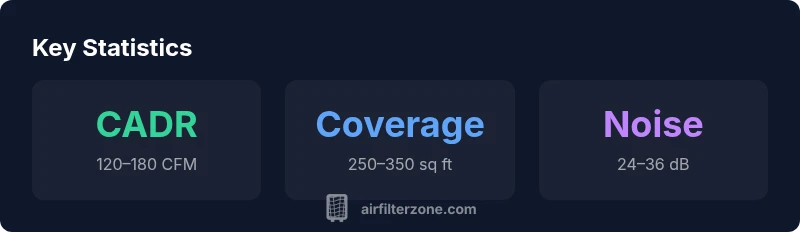
The purifier is designed for small-to-medium rooms. Match it to a space within its stated CADR-based coverage to maintain comfortable air quality, and consider a second unit for larger open-plan areas.
Best for small to medium rooms; pair with another unit for larger spaces.
Does it integrate with voice assistants or smart home ecosystems?
You can control it via the companion app and supported smart-home workflows. While many users expect voice-assisted control, verify compatibility with your devices and regional availability before purchase.
App-based control is reliable; check your devices for voice assistant compatibility.
How often should I replace the filters?
Filter lifespans typically range from 6 to 12 months, depending on usage and pollutant load. Monitor the device’s indicator and replace filters when performance declines or the indicator signals.
Most users replace filters every 6 to 12 months.
Can it remove odors or VOCs effectively?
The activated carbon layer helps with odors and VOCs, but effectiveness depends on the intensity and persistence of the source. For persistent odors, consider additional ventilation or multiple purifiers.
Activated carbon aids odor control, but results vary with odor strength.
Is it energy-efficient for daily use?
Yes, at lower speeds it uses only a few watts, making it suitable for continuous use in bedrooms or offices. Higher speeds draw more power, so plan operation around your energy and comfort needs.
Low power at quiet speeds, higher power at fast modes.
How loud is it on high performance?
On high speed, you will notice more ambient sound, but most users report it remains acceptable for conversations in living spaces. If noise is a concern, use auto-mode or lower settings at night.
Expect some noticeable sound at high speed; daytime use is often comfortable.
Quick Summary
- Choose the model based on room size and CADR rating
- Leverage the app for real-time air quality and automation
- Expect routine filter replacements to maintain performance
- Use auto mode for hassle-free operation in variable conditions
- Pair with ventilation strategies for best results