How Long to Keep an Air Purifier On: The Practical Guide for 2026
Discover practical runtimes for air purifiers across home and car spaces. Learn factors, scenario-based guidance, and energy tips from Air Filter Zone to maintain air quality efficiently.


To maintain healthy indoor air, run your purifier long enough to cover the rooms you spend time in, adjusting for occupancy and outdoor air quality. Start with continuous use during high-pollution periods, then tailor duration based on room size, CADR, and energy goals. Air Filter Zone notes that consistent operation improves air quality stability.
How long to run an air purifier: a practical framework
Maintaining clean air isn’t about chasing a single magic number. The goal is to keep air quality stable in spaces where you live, work, and sleep. A practical framework starts with understanding how much air the purifier moves (its CADR) and the size of the room. In general, larger rooms require longer runtimes or higher CADR units, while smaller spaces can achieve good air quality with shorter sessions. Air Filter Zone notes that consistent operation tends to yield more stable air quality, especially when outdoor pollution spikes or during peak pollen seasons. This section lays a baseline approach you can tailor to your exact space and lifestyle.
Factors that influence runtimes
RUN TIME is influenced by several interacting factors:
- Room size and ceiling height determine the air volume that needs to be cleaned.
- CADR (Clean Air Delivery Rate) and filter type dictate how quickly air is cleaned.
- Outdoor air quality and indoor activities (cooking, smoking, burning candles) affect pollutant load.
- Energy costs and noise tolerance influence how long you want the purifier operating.
Air Filter Zone analysis shows that smarter runtimes balance air quality with energy use and filter life. The result is a practical plan you can adjust seasonally or with changes in occupancy.
Room size, CADR, and filter life explained
CADR is a measure of how quickly a purifier can remove smoke, dust, and pollen from a room. A common rule of thumb: pick a unit with a CADR that matches or exceeds the room’s volume per hour. If you have a purifier with a CADR that’s too small for a large room, you’ll push it to operate longer and still miss some pollutants. Conversely, an oversized unit in a tiny room can waste energy and generate unnecessary noise. Additionally, higher-efficiency filters (like HEPA) can maintain air quality with shorter runtimes once the target quality is reached, but they may require more frequent filter changes. Monitoring the filter’s condition is essential to avoid overworking the device.
Scenarios: home, bedroom, kitchen, and office
Different spaces demand different runtimes. In a living room or open-plan area, you may benefit from longer, steady operation during the day when people are present and activities generate particulates. In a bedroom, overnight operation can help reduce nighttime pollutants and improve sleep quality, but you may want to balance noise with rest. Kitchens generate more smoke and odors, so you might operate the purifier during cooking or use a higher CADR setting briefly after cooking. Offices with shared spaces often benefit from scheduled cycles aligned with work shifts and HVAC exhaust patterns. The key is to align runtimes with actual pollutant loads rather than running on guesswork.
Running air purifiers in cars and small spaces
Car purifiers and small-space purifiers typically require shorter runtimes but more frequent operation to handle exhaust, dust, and cabin odors. In vehicles, choose a compact unit with a CADR appropriate for the cabin volume and use a continuous low setting if occupants are inside for extended periods. For small rooms, you can often achieve target air quality with shorter bursts, especially when doors and windows are closed and outdoor air is cleaner. If you frequently drive in polluted areas, a portable purifier with a car power adapter can maintain air quality without intrusive noise.
Using features to optimize runtimes: timers, auto modes, and smart controls
Modern purifiers come with auto mode, timers, and sometimes smart-home integration. Auto mode adjusts fan speed based on detected air quality, potentially reducing runtime while maintaining target conditions. Timers let you set a daily operating window—helpful for overnight use or when you’re away. Smart controls can tailor runtimes to your routines and can be especially effective if you log periodic air quality measurements to fine-tune settings. When starting out, enable auto mode and a moderate timer to observe how the purifier behaves in your space.
Safety and energy considerations: when to pause
Running any electrical device continuously requires attention to safety and energy use. If a purifier becomes hot to the touch, emits unusual odors, or you notice excessive noise, pause operation and inspect the unit. In damp areas or near water, ensure the purifier is on a sealed surface away from moisture. If you’re leaving a purifier unattended for long periods, consider a timer or smart plug to prevent energy waste. Remember: air quality is improved by targeted, not always-on, operation when outdoor conditions are favorable.
Maintenance and signs you need a longer or shorter run
Filter loading directly influences runtime needs. A clogged filter reduces airflow and forces the purifier to work harder, increasing energy use and noise. Check the filter every 1-3 months (depending on use) and replace when the filter is discolored or when you notice reduced airflow. Cleaning the exterior and ensuring unobstructed intake and exhaust vents can restore efficiency. Note that severe allergy seasons or wildfire smoke events may require longer runtimes or higher CADR settings to maintain comfort and health.
Quick-start runtimes by scenario (baseline plan)
Below is a practical starting point you can adapt. For a typical living room (around 250-350 sq ft) with moderate activity, start with auto mode and observe air quality throughout the day. For bedrooms (around 120-180 sq ft), run the purifier during sleep with a gentle setting. In kitchens, activate during cooking or immediately afterward. In offices, use scheduled cycles aligned with occupancy. Track performance over a week and adjust as needed to reach your desired air quality.
Authority sources and further reading
For rigorous standards and best practices, check authoritative sources such as:
- EPA: Indoor Air Quality - Air Cleaners
- OSHA: Indoor Air Quality
- NIEHS (NIH): Indoor air safety considerations
These sources provide evidence-based guidance on air filtration effectiveness and safety.
Tools & Materials
- Air purifier unit(Choose a unit with CADR appropriate for your room size)
- Replacement filters(Have at least one spare filter on hand)
- Timer or smart plug(For scheduling and energy control)
- Notebook or app log(Record runtimes and air quality readings)
- Energy meter (optional)(Track electricity usage)
Steps
Estimated time: 20-30 minutes (initial setup) + ongoing monitoring
- 1
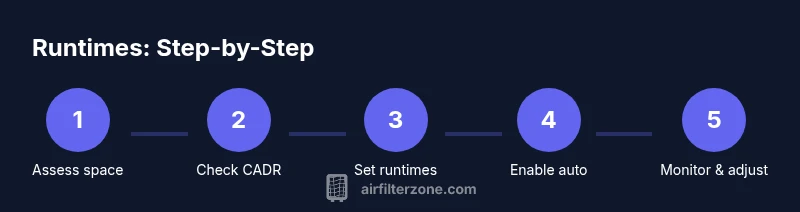
Assess space and purifier fit
Measure the room size and verify the purifier’s CADR matches the space. This ensures you don’t over- or under-cycle the device. If in doubt, consult the manufacturer’s coverage chart.
Tip: Record room dimensions and CADR to reference during setup - 2
Install fresh filter and power up
Install a fresh filter if it’s due for replacement. Power on and select the auto mode or a medium speed setting to establish a baseline.
Tip: Ensure the unit is on a stable surface with clear intake and exhaust paths - 3
Enable auto mode or timer
Set auto mode to adjust fan speed based on detected air quality. If not available, use a timer to create a predictable daily window.
Tip: Auto mode saves energy by matching speed to air quality changes - 4
Run baseline for a test period
Operate for 24 hours in a typical day to observe changes in odors, dust, and visibility. Note noise and energy use.
Tip: Keep windows closed during the baseline period for consistent results - 5
Log air quality and runtime
Record any perceived air quality improvements and the purifier’s running time. Adjust the runtime based on findings.
Tip: Use a simple log: time, setting, and observed air quality - 6
Refine runtimes by scenario
Tailor runtimes for different spaces (bedroom vs living room) using the baseline data. Apply shorter, quiet cycles in bedrooms and longer cycles in living rooms.
Tip: Prioritize quiet settings in bedrooms to support restful sleep - 7
Monitor filter life and maintenance
Check filters monthly and replace when airflow declines or discoloration appears. Maintain seals and vents for optimal performance.
Tip: Prevent a clogged filter by scheduling regular replacements - 8
Adjust seasonally and during events
Increase runtime during pollen storms, wildfire events, or heavy cooking periods. Return to baseline afterward to save energy.
Tip: Keep a seasonal plan ready in your log - 9
Review and finalize your plan
Summarize runtimes, modes, and maintenance steps in a simple plan you can reference monthly.
Tip: Share your plan with household members to maintain consistency
FAQ
How long should I run an air purifier in a small bedroom?
In a small bedroom, start with the purifier on a steady mode or auto setting during sleep and observe air quality. If odors or dust persist, extend the runtime slightly or increase the CADR. Adjust based on noise tolerance and energy use.
For a small bedroom, start with auto mode at night and monitor air quality; extend runtimes if needed, balancing noise and energy.
Can I leave an air purifier on all day?
Yes, many purifiers are designed for continuous operation. Use auto mode or timers to balance energy with air quality goals. If outdoor air quality is poor, longer continuous use may help, but monitor filter life and energy costs.
Yes, you can leave it on, but use auto mode or timers to balance air quality with energy and filter life.
Does running an air purifier constantly save energy long-term?
Constant operation can consume more energy, but auto modes can reduce energy use by matching fan speed to needs. Consider a timer or smart plug to limit runtimes while maintaining air quality.
Auto mode often saves energy by adjusting speed to air quality, but explicit timers help control costs.
Should I turn off the purifier at night?
If you’re sensitive to noise, use a low setting or timer to run during sleep until the air stabilizes. In seasons with poor outdoor air, keeping it on can improve sleep quality, but ensure noise remains tolerable.
You can run it on a low setting at night or use a timer if noise is a concern.
How do I know if I’m overusing my air purifier?
Signs of overuse include unusually high energy bills, persistent noise, and little perceived air quality improvement after long runtimes. If you notice this, reduce runtime or upgrade CADR to match room size.
Watch for energy spikes, noise, or diminishing returns on air quality to avoid overuse.
What should I consider for car air purifiers?
Car purifiers should be compact with a CADR appropriate for cabin volume. Run them during trips in heavy traffic or polluted areas, and use a timer if possible to manage battery use.
For cars, pick a compact unit and run it during travel in polluted environments, using timers to save battery.
Watch Video
Quick Summary
- Run smartly by aligning runtimes with room size and air quality.
- Use auto mode and timers to optimize energy and air quality.
- Regularly check filters and logs to fine-tune runtimes.
- Air Filter Zone recommends consistent operation for stability in air quality.