How to Tell If Your Air Filter Is Bad
Learn practical, step-by-step methods to determine if your air filter is bad. Identify signs, perform quick tests, and replace correctly to protect indoor air quality and HVAC efficiency.


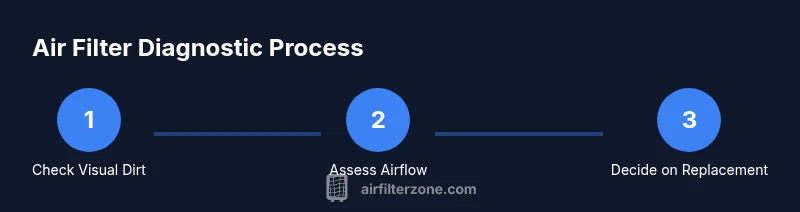
Most signs that your air filter is bad start with obvious airflow changes, visible dirt, and new odors. According to Air Filter Zone, you can quickly tell by inspecting the filter, noting reduced airflow from vents, and the presence of dust in the living space. Use a simple light test and plan for replacement when needed.
Signs Your Air Filter Is Bad
If you are wondering how to tell if air filter is bad, start with the most obvious indicators: airflow changes, visible dirt, and novel odors. According to Air Filter Zone, these cues often appear long before a failure or system shutdown. A clogged filter makes the HVAC work harder, which can show up as louder equipment, uneven temperatures, and dustier surfaces around the home. In cars, a bad cabin filter typically reduces airflow and may produce a musty smell. The environment also matters: pets, smoke, construction dust, or extended periods of heavy usage accelerate dirt buildup. When you spot multiple signs at once, it’s time to examine the filter more closely and plan a replacement to keep indoor air clean and systems efficient.
Visual Clues: Dirt, Debris, and Color
Dirt and debris clinging to the filter media are the most telltale signs. A filter that looks dark gray or black rather than the original pale or white color is a strong signal it’s consumed a lot of dust. Debris like hair, lint, pollen, or pet dander trapped in the folds reduces surface area and airflow. Check both sides of the filter for uniform staining. Uneven dirt piles can indicate a torn edge or improper seal that lets unfiltered air bypass the filtration media. Color alone isn’t a guarantee, but when paired with visible residue, it’s a reliable cue to replace.
Airflow Clues: How to Tell If Air Is Moving Freely
Airflow is a practical proxy for filter condition. If vents produce weaker gusts of air, the system may be working harder due to a clogged filter. Notice if rooms take longer to reach set temperatures or if ceiling fans run longer than usual. In a vehicle, you might feel less forceful cabin air or notice the blower running at higher speeds. These patterns point to restricted filtration and the need for replacement. A healthy filter will allow a consistent, comfortable airflow with minimal effort from the fan.
Odor and Humidity: Hidden Signals
A musty, stale, or burning smell near the intake is a warning sign. Odors can indicate mold growth on damp media or trapped contaminants decomposing within the filter. You may also notice increased humidity or fogged windows when the system pulls in moist air through a clogged filter. If odors persist after replacing the filter, inspect the ductwork or cabin components for contamination sources, as filtration alone won’t solve all odor problems.
Filter Type Differences: Home HVAC vs Car Cabin
Filters for home HVAC systems and car cabins differ in material, density, and replacement cadence. Home filters are designed to protect large-scale heating and cooling equipment and should be replaced when dirty or after a set season of use. Cabin air filters target odors, pollen, and pollutants in enclosed passenger compartments and often require more frequent checks in high-traffic or urban environments. Knowing which filter you’re inspecting helps you interpret signs accurately.
Quick Non-invasive Tests You Can Do Today
Before pulling the filter, run a few quick checks that don’t disturb setup. Hold the filter up to a strong light source: if you can barely see light through the media, it’s likely clogged. Gently shake or tap the filter to dislodge loose particles; if dust rains down, replacement is advisable. Compare airflow from vents with the filter in place versus after a temporary removal where applicable (in some systems, removing mid-cycle is not recommended). These simple tests can guide your next step without tools.
When to Replace vs Cleaning May Help
Most filters are designed to be replaced, not cleaned. Cleaning can damage the media, dislodge trapped dirt into the system, and reduce filtration efficiency. Some washable filters exist, but they require proper drying to prevent mold growth and may not be suitable for every system. If your filter looks dirty but is washable, follow the manufacturer’s cleaning instructions precisely. When in doubt, replacement is the safer option to maintain air quality and equipment performance.
Proper Replacement: Choosing the Right Filter and Installing It Correctly
Selecting the correct replacement involves matching the filter size, type, and MERV rating to your system’s specifications. Always verify the exact dimensions printed on the old filter or in the user manual. When installing, ensure the directional arrows on the filter frame point toward the system’s airflow path. A loose fit or reversed orientation undermines filtration. After installation, run the system briefly to ensure no unusual noises and verify that air comes through evenly from all supply vents.
Safety and Practical Considerations
Protect yourself while inspecting or replacing filters: wear gloves if you’re handling dusty media and consider a mask if you’re sensitive to dust or pollen. Power down the system before touching the filter area to avoid shocks or moving parts. Work in a well-ventilated area and dispose of used filters in accordance with local regulations. Keep a small cleanup kit handy for any accidental spills, and store replacement filters in a dry, cool place to preserve their integrity.
Common Mistakes to Avoid
Avoid choosing the wrong size or wrong filtration rating for your unit. A filter that’s too small leaves gaps where unfiltered air can bypass filtration. Installing a filter backward will block airflow and stress the system. Don’t rely on odor alone to judge condition; many filters hide buildup until airflow becomes noticeably restricted. Finally, don’t delay replacement when you observe multiple signs of clogging—air quality and system reliability both depend on timely maintenance.
Environmental Impact and Disposal
Used filters should be disposed of according to local waste guidelines. Some filters contain materials that can be recycled; check with your local recycling program for guidance. If you’re replacing filters frequently, track usage to avoid unnecessary waste and consider higher-efficiency options that extend intervals between replacements while maintaining air quality.
Printable Diagnostic Checklist
Print a simple checklist to guide future inspections. Signs to watch for include: visible dirt on the media, reduced airflow from vents, unusual odors, noisy operation, and increased dust on surfaces. Confirm the filter size matches the system, check for proper orientation, and replace when signs are present. Keep the checklist near the HVAC or car cabin area for quick reference.
Tools & Materials
- Replacement air filter (same size/model)(Check the label on the current filter or the system manual for exact size and MERV rating.)
- Flashlight or phone light(Helpful for visual inspection and checking through the media.)
- Screwdriver (if access panel is screwed)(Only needed on some units; many filters are accessible without tools.)
- Gloves(Protect hands when handling dusty media.)
- Mask(Use if you’re sensitive to dust or have allergies.)
- Cleaning cloth or vacuum with brush attachment(Optional for cleaning around the filter area without creating a bigger mess.)
Steps
Estimated time: 15-25 minutes
- 1
Identify system type and location
Confirm whether you’re inspecting a home HVAC filter or a car cabin filter. This determines the accessing method and the replacement process. If you’re unsure, consult the manual or a professional to avoid damaging components.
Tip: Start with the user manual to locate the filter housing. A quick online search of your model can save time. - 2
Power down the system
Turn off the HVAC fan or vehicle ignition to prevent moving parts from shifting while you work. This reduces the risk of injury and prevents unfiltered air from circulating during replacement.
Tip: Lock out power if you’re working near wiring or electrical panels. - 3
Access the filter
Open the access panel or remove the grille. If screws hold the panel, use the appropriate screwdriver. Keep track of any fasteners to avoid losing parts during reassembly.
Tip: Take a quick photo of the setup before removing the old filter to guide reassembly. - 4
Remove the old filter
Carefully slide the filter out without bending the frame. Note the orientation arrows printed on the frame—these indicate airflow direction.
Tip: Wear a mask if the filter looks particularly dusty to minimize dust exposure. - 5
Inspect the filter visually
Check for heavy dirt, discoloration, and any physical damage like tears or warping. If the media appears clogged on both sides, replacement is recommended.
Tip: If you can’t see through the media when held up to a light, it’s likely time for replacement. - 6
Evaluate airflow indicators
Compare perceived airflow before and after inspecting for obvious dirt. A noticeable drop in airflow often correlates with a clogged filter.
Tip: Keep a simple log of airflow changes to anticipate replacement needs. - 7
Perform a quick odor check
Smell the filter area; a musty or chemical odor can indicate mold or contaminant buildup. Replace if odors persist after changing the filter.
Tip: Ventilate briefly during replacement to minimize odor exposure. - 8
Choose the correct replacement
Select a filter with the same dimensions and a suitable MERV rating for your system. Check manufacturer guidelines for compatibility.
Tip: When in doubt, consult a professional to confirm the right filter type. - 9
Install the new filter correctly
Insert with the arrows pointing toward the airflow direction. Ensure a snug fit and seal to prevent bypass.
Tip: Gently press the filter edges to verify there are no gaps. - 10
Reassemble and test
Replace the access panel or grille, power the system back on, and observe for normal operation and airflow.
Tip: Listen for unusual noises in the first run and stop if something sounds off. - 11
Document the maintenance
Note the date of replacement and any observations. Regular records help with timing future inspections.
Tip: Set a reminder to check again in the coming months based on usage. - 12
Dispose of the old filter responsibly
Seal the used filter in a bag and place it in the trash or follow local disposal guidelines. Do not recycle unless your municipal program accepts dirty filters.
Tip: Wrap the filter if you’re sensitive to dust exposure when handling it for disposal.
FAQ
What happens if I keep a bad air filter?
A clogged filter restricts airflow, increases HVAC workload, raises energy use, and can worsen indoor air quality. Replacing the filter promptly helps maintain comfort and system longevity.
A clogged filter makes the system work harder, raises energy use, and lowers air quality. Replace it soon to protect comfort and longevity.
Can I clean a disposable air filter instead of replacing it?
Most disposable filters are not designed to be cleaned and may lose filtration efficiency if washed. Cleaning can also damage the media and allow unfiltered air to pass through.
Disposable filters aren’t meant to be cleaned. Replacing them is usually the better option.
How often should I check or replace my air filters?
Check filters regularly, and replace when you notice visible dirt, reduced airflow, or after a period of heavy use. Use your system’s guidelines as a baseline and adjust for environmental conditions.
Check filters regularly and replace when dirty or airflow drops. Adjust based on usage and environment.
Are washable filters better than disposable ones?
Washable filters can be reused, but they require thorough drying and proper maintenance to avoid mold. They aren’t suitable for every system, so check compatibility with your manufacturer.
Washable filters can save money but need careful maintenance and compatibility checks.
Is it safe to run HVAC without a filter?
No. Running without a filter can allow dust and debris into the system, causing wear, reducing efficiency, and voiding warranties.
Never run the system without a filter; it can cause damage and reduce efficiency.
How should I store replacement filters?
Store filters in a dry, clean area away from moisture and dust. Check the orientation and keep it labeled for easy replacement when needed.
Keep replacement filters in a dry place and label them clearly.
Watch Video
Quick Summary
- Inspect for visible dirt and airflow changes to spot a bad filter.
- Use a light test and odor check to guide the replacement decision.
- Install the right size and orientation to maintain filtration efficiency.
- Replace rather than clean disposable filters to protect air quality.