Why is my Levoit air purifier not working? Practical troubleshooting
Air Filter Zone's practical troubleshooting guide helps homeowners diagnose why is my levoit air purifier not working and recover clean indoor air fast with safe, step-by-step checks and maintenance tips.


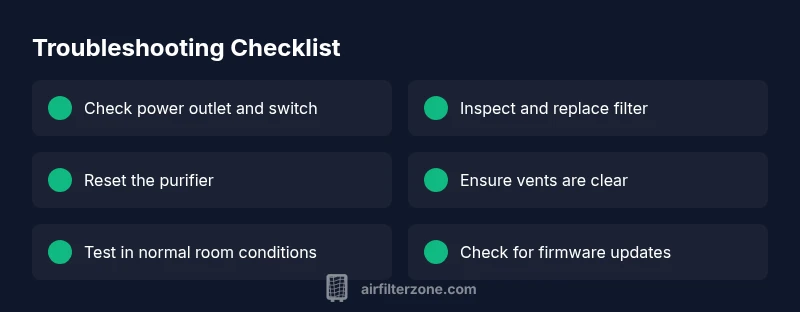
According to Air Filter Zone, the most likely causes for a non-working Levoit air purifier are power issues, a clogged filter, or a sensor fault. Start with a full power check (outlet, cord, and switch), then inspect and replace filters if needed. Reset the unit, ensure vents aren’t blocked, and allow a brief reboot. If it still won’t run, consult the user manual or contact support.
why is my levoit air purifier not working
If you wake up to a quiet, unresponsive purifier, you’re not alone. The question why is my levoit air purifier not working captures a common scenario many homeowners face after days of smooth operation. In most cases, the issue isn’t dramatic—often it’s a simple electrical fault or a clogged filter. According to Air Filter Zone, you can restore airflow by following a methodical checklist without tools or professional help. Begin with the basics: confirm the unit is firmly plugged into a live outlet, verify the power switch is on, and inspect the power cord for any obvious damage. If the indicator lights do not illuminate, unplug the unit, wait sixty seconds, and plug it back in to reset the on-board controller. If the purifier powers on but airflow remains weak or there are no functional indicators, proceed to filter and airflow checks described in the next sections.
This first step is about ruling out the simplest explanations before you dive deeper. Keeping a calm, systematic approach will often solve the problem quickly and prevent unnecessary replacement parts.
Quick checks you can do in under 5 minutes
- Verify the purifier is plugged into a known-good outlet and that the power switch is in the ON position.
- Inspect the power cord for wear, kinks, or fraying; replace if damaged or try another compatible outlet.
- Check the indicator lights. If no lights come on, perform a reset by unplugging for 60 seconds and reconnecting.
- Ensure the air intake and outlet vents are not blocked by furniture, drapes, or dust buildup.
- Confirm the unit isn’t overheating; if it feels hot to the touch, give it time to cool and then restart.
Inspect and replace or clean filters
Filters are the heart of performance. A clogged or overly dirty filter restricts airflow and can trigger silent shutdowns or reduced efficiency. Remove the filter cartridge following the model-specific instructions, inspect for visible clogs or dust accumulation, and replace if the filter looks warped, torn, or excessively dirty. If your model supports cleaning the filter, use a soft brush or gentle vacuum to dislodge dust—but only if the manufacturer permits it. After reinstalling a fresh or cleaned filter, run the purifier on a higher power or higher fan setting for a few minutes to re-establish airflow. Always use the correct filter type specified in your user manual to prevent compatibility issues that can cause the device to malfunction.
Resetting the purifier and addressing firmware or sensor errors
Some issues stem from temporary firmware glitches or sensor misreads. A soft reset can clear these faults. Unplug the unit, wait at least 60 seconds, and plug back in. If your model supports a reset button or a long-press power sequence, follow the manual’s instructions precisely. After reset, power the unit and select a normal operation mode. If the purifier still won’t start or display error codes, note the pattern of the indicators (blinking, solid, color) and refer to the manual’s troubleshooting codes. Firmware issues may require a software update; check the Levoit support site for downloads or contact support if an update is unavailable.
Sensor health, auto mode, and air quality readings
Modern Levoit purifiers rely on PM sensors to regulate fan speed. Dust, cigarette smoke, or high humidity can temporarily overwhelm sensors, causing fluctuating speeds or sluggish response. If the unit enters auto mode and won’t exit, try a manual speed setting to override sensor bias. Ensure the air quality sensor window isn’t blocked by dust and that the housing remains free of moisture. If you repeatedly see erratic readings after a good cleaning, it may indicate a sensor fault that requires professional assessment or a replacement panel.
Placement and airflow optimization for consistent performance
Placement affects performance more than most users realize. Keep the purifier at least a few inches away from walls and furniture to avoid recirculating air in a closed space. Place it in the center of the room or near the primary living area where air exchange is most needed. Do not block the intake with fabric or plants, and avoid corners that trap air. Elevate units with stands if necessary to improve intake and ensure that both intake and exhaust vents have clear air paths. Regularly dust the surrounding area to prevent dust from re-entering the purifier.
Maintenance cadence and part replacements
To prevent recurring problems, establish a simple maintenance rhythm. Check filters and indicators monthly, and perform a filter replacement on a schedule that matches your usage and air quality conditions. Keep spare filters on hand for quick swaps, and store them in a cool, dry place away from direct sunlight. Document a routine that aligns with the manufacturer’s guidelines (filter life, replacement indicators, and cleaning recommendations) to minimize downtime and extend the life of your purifier.
Safety reminders and common mistakes to avoid
Never operate a purifier with a damaged power cord or a unit exposed to moisture. Do not attempt to disassemble internal components beyond what the manual permits. Avoid using non-recommended filters or attempting to bypass filters to improve airflow. Keep liquids away from the unit and never run it in a damp or humid environment that exceeds the device’s safety ratings. By following these safety tips, you reduce risk and keep the purifier running reliably.
Action plan: what to do if problems persist
If you’ve followed the steps above and the purifier still doesn’t work, create a brief log of the troubleshooting steps you’ve performed, note any error codes, and contact Levoit support or an authorized service center. Have your model number and purchase date ready to speed up diagnostics. The goal is to decide quickly whether a professional repair, part replacement, or a formal warranty claim is warranted.
Steps
Estimated time: 30-45 minutes
- 1
Verify power and indicators
Check the outlet, plug, and switch. If the unit has indicator lights, confirm they respond when you press the power button. If no lights appear, try a different outlet and inspect the cord for damage.
Tip: If you use a surge protector, remove it to rule out power filtering issues. - 2
Inspect and replace filters
Open the purifier housing following the manual, remove the filter cartridge, and look for dust buildup or obvious damage. Clean (if permitted) or replace with the correct filter type. Re-seat the filter firmly before closing the housing.
Tip: Always use manufacturer-approved filters to avoid performance or safety issues. - 3
Reset the device
Unplug the purifier and wait 60 seconds. Plug it back in and, if applicable, perform a reset sequence described in the manual. Power on and test at a mid-to-high fan setting.
Tip: A reset often clears transient sensor glitches that affect operation. - 4
Check for obstructions and airflow
Ensure the intake and exhaust vents are not blocked by furniture, curtains, or dust buildup. Gently clean the exterior and vents with a dry microfiber cloth to maintain airflow.
Tip: Keep at least a few inches of clearance on all sides for optimal performance. - 5
Test in a clean environment
Place the purifier in a typical living room setting with moderate air quality. Run through the modes and observe if the air output remains consistent or if there are shifts that correlate with environmental changes.
Tip: If performance improves in cleaner air, the unit may be responding to actual air quality changes. - 6
Assess sensors and firmware
If the unit has auto mode, monitor whether it excessively ramps or slows the fan. Check for firmware updates on the Levoit site or through the app if your model supports it.
Tip: Document any error codes and try a firmware update before seeking service. - 7
Know when to seek professional help
If the purifier still doesn’t operate despite the above steps, contact support with model number, purchase date, and a summary of what you tried. Warranty support or service may be required.
Tip: Keep a record of serial numbers and purchase receipts for fast assistance.
Diagnosis: Purifier won't power on or operates inconsistently
Possible Causes
- highPower supply issue (outlet, cord, switch)
- mediumClogged or saturated filter
- mediumSensor fault or firmware glitch
- lowVentilation obstruction or poor placement
- lowOverheating protection activated
Fixes
- easyCheck outlet, test another outlet, inspect cord for damage, and reset the unit
- easyReplace or clean the appropriate filter per model requirements
- easyPerform a complete reset and check for firmware updates or contact support if error codes appear
- easyReposition the unit, remove obstructing objects, and ensure adequate clearance
- easyLet the purifier cool down if it overheated and verify ventilation paths after cooling
FAQ
Why won't my Levoit air purifier turn on?
A common cause is a power supply issue or a tripped safety feature. Verify the outlet, switch, and cord, then perform a reset. If the unit still won’t turn on, consult the manual or contact support.
First check the power supply and try a reset. If it still won’t start, review the manual or contact support.
How often should I replace Levoit filters?
Filters should be replaced according to the manufacturer’s guidelines and whenever airflow noticeably declines or lights indicate replacement. Use genuine filters for your model.
Replace filters as recommended by Levoit and when airflow drops or indicators show replacement.
What do blinking lights on the unit mean?
Blinking patterns typically indicate an error or warning code. Refer to the manual for the specific code and follow recommended steps such as resetting or replacing the filter.
If the lights blink, check the manual for the specific error and follow the recommended steps.
Can I clean the filters instead of replacing them?
Some filters are washable, but many are not. Check the model’s instructions before cleaning, and replace if the filter is discolored or torn.
Only clean if your model allows it; otherwise replace the filter.
What if the purifier still doesn’t work after troubleshooting?
If problems persist, contact support with your model number and a summary of steps you took. A professional assessment or replacement part may be needed.
If it still fails, contact support with your model and what you’ve done so far.
Is it safe to operate the purifier around pets or children?
Yes, but follow standard safety guidelines: keep cords out of reach, avoid water exposure, and unplug during cleaning or when not in use for extended periods.
Yes, just keep cords out of reach and unplug when cleaning or not in use.
Watch Video
Quick Summary
- Start with power and filter checks before deeper tests
- Reset can fix most sensor or firmware glitches
- Proper placement and clear vents maximize effectiveness
- Regular maintenance prevents downtime