What to Do If the Air Purifier Isn't Working
Urgent, practical troubleshooting guide to diagnose and fix a non-working air purifier. Safe, step-by-step checks, a diagnostic flow, and expert tips to restore clean air quickly.


Most likely the purifier isn’t turning on due to a simple power issue or a clogged filter. Start by confirming the outlet works and the unit is fully plugged in, then check the power switch and any safety lock. If the display remains dark, move to a basic diagnostics flow before replacing parts.
Common reasons an air purifier stops working
If your air purifier isn’t functioning, the reason isn’t always dramatic. According to Air Filter Zone, most issues fall into a few predictable categories: power/outlet problems, a blocked or overdue filter, a safety shutoff triggered by the device, or a simple user setting that accidentally turned it off. Start with the basics and don’t assume a defective motor—modern purifiers have safety features and sensors that prevent operation when conditions aren’t safe. In many cases, resolving the issue is quick and non-destructive: a plug-in test, a filter check, and a soft reset. Taking a methodical approach reduces downtime and helps you restore clean air faster. The moment you notice a unit that won’t start, pause and verify the basics first: is the power light on, is the unit you’re using actually the one you intend to operate, and is the device within its recommended operating range? Even a small misplacement—like a purifier that sits too close to a wall—can affect airflow and trigger protective shutdowns. By understanding these common culprits, you can quickly narrow down the cause and act with confidence. Remember that not every non-start is a motor problem; often the solution is a simple reset, filter check, or outlet swap.
Safety first: quick checks you can do without opening the unit
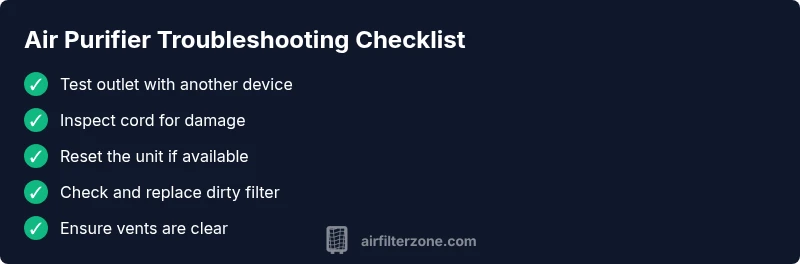
Safety comes first when troubleshooting any electrical appliance. Begin with non-invasive checks you can perform with the unit unplugged. Confirm the outlet works by testing another device, then inspect the power cord for visible damage and ensure the plug is fully seated. Reconnect and power on, watching for the indicator lights or display to respond. If there’s a reset button or a safety lock, make sure it isn’t engaged—some models lock out operation to prevent injury or damage. Note any unusual smells, sounds, or heat, which could indicate a fault that requires professional attention. While these steps don’t involve opening the case, they often resolve most simple failures and set the stage for deeper diagnostics if needed. Also check that the air intake and exhaust vents are clear of dust and obstructions; restricted airflow can sometimes be mistaken for a total failure because the unit won’t complete its startup sequence. If nothing responds after these checks, move on to the diagnostic flow.
Understanding error codes and indicators
Many units display indicators or codes to signal the problem. If you see a specific code, consult the manual or the manufacturer’s online support page to translate it into a fix. Even without a code, a blinking light or abnormal beeping can guide your next steps. Some models use color-coded LEDs to indicate filter status, motor temperature, or airflow restrictions. In most cases, a simple reset clears transient faults, while a clogged filter or blocked intake triggers a protected shutoff. Remember to stay within the model’s recommended operating range and avoid attempts that require opening the housing unless you’re qualified. If the indicators point toward a maintenance item (like a dirty filter), proceed to the next section to fix it safely.
Diagnostic flow: symptom → diagnosis → solutions
This section presents a practical flow you can follow when an air purifier isn’t working. Start with the symptom you observe (e.g., no power, no airflow, error code). Then map it to the most likely diagnosis and apply the corresponding fix. If the first fix doesn’t restore function, move to the next item in the flow. Always test after each step to isolate the cause. This approach keeps the process organized and reduces unnecessary part replacements.
Step-by-step: fixes for the most common cause
- Step 1 — Power and outlet test: Unplug the purifier, inspect the cord for damage, and plug into a known-good outlet. If the unit powers up, the issue was with the original outlet. Tip: use a different outlet to confirm power consistency.
- Step 2 — Reset and controls check: Some purifiers have a reset pattern or lock mode. Unplug for 30 seconds, then plug back in and try the power button again. Tip: consult the manual for model-specific reset steps.
- Step 3 — Filter status: Check the filter indicator and inspect the slot. If you can access the filter, remove and reseat it correctly. Tip: avoid touching the filter with wet hands.
- Step 4 — Filter replacement: If the filter is visibly dirty or overdue, replace with an approved filter for your model. Tip: never force a filter into a tight slot.
- Step 5 — Airflow check: Ensure nothing is blocking the intake or exhaust vents. Move it away from walls and large furniture. Tip: maintain a clearance of several inches around the unit.
- Step 6 — Deep diagnostics: If available, run any built-in self-test or firmware check. Tip: keep firmware up to date if the model supports it.
- Step 7 — When to seek help: If there’s burning, buzzing, or persistent failure after all steps, disconnect and contact support. Tip: collect the model number and error code before calling.
Estimated time: 15-30 minutes
Prevention tips to avoid future failures
To minimize future problems, perform quick maintenance on a routine that fits your usage pattern. Replace filters on schedule as recommended by the manufacturer, place purifiers away from heat sources and moisture, and regularly clean vents using a dry microfiber cloth. Keep the device away from damp areas and never use harsh cleaners that could damage internal components. Periodically inspect cords for wear and ensure power outlets remain stable and compatible with the purifier’s power requirements. By staying proactive, you’ll reduce sudden breakdowns and keep air clean with minimal downtime.
When to call a professional
If basic troubleshooting doesn’t restore function, or you notice signs of electrical trouble, unusual smells, smoke, or heat, it’s time to seek professional help. A qualified technician can diagnose internal circuitry, fan motor issues, or sensor faults that aren’t user-serviceable. In these cases, avoid opening the device yourself, which can void warranties or create safety hazards.
Steps
Estimated time: 15-30 minutes
- 1
Check power and outlet
Unplug the purifier, inspect the power cord for visible damage, and plug into a known-good outlet. Turn the unit on and confirm the power indicator lights up.
Tip: Use a different outlet to verify power consistency. - 2
Test different outlets
If the unit doesn’t respond, test it on another outlet in a different room. This helps rule out a faulty wall outlet.
Tip: Avoid power strips that can fail under load. - 3
Inspect control panel and safety lock
Look for a locked panel or a child safety feature. If a lock is engaged, disable it following the manual.
Tip: Ensure the unit is not in a mode that disables operation. - 4
Check or replace the filter
Open the filter compartment, inspect the filter; if dirty or overdue, replace with the correct type and reseat securely.
Tip: Handle filter by edges, not the pleats. - 5
Reset the purifier
Perform a power cycle: unplug, wait a moment, plug back in, and press the power button.
Tip: Some models require a hold for 3-5 seconds to reset. - 6
Check for airflow blockages
Ensure intake/exhaust vents are clear and not obstructed by furniture or drapes.
Tip: Maintain several inches of clearance around the unit. - 7
Consult manual or support
If none of the above steps restore function, consult the model’s manual or contact customer support.
Tip: Have your model number and any error codes ready.
Diagnosis: Air purifier won't turn on or respond to controls
Possible Causes
- highPower outlet or cord issue
- mediumTripped safety switch or blown fuse
- lowClogged or overdue filter causing safety shutoff
Fixes
- easyTest the unit on a known-good outlet and inspect the power cord for damage
- easyReset the purifier and, if applicable, the circuit breaker or GFCI outlet
- easyReplace the filter if clogged and ensure proper seating
- mediumConsult manual for reset patterns or contact support if the issue persists
FAQ
Why won't my air purifier turn on?
Most non-working units are caused by power problems. Check the outlet, cord, and switch, and try a reset if possible.
Check power, then reset if available.
What should I do if an error code shows on the display?
Consult the manual for code definitions and reset if allowed; if unresolved, note the code and contact support.
Look up the error code in the manual and reset if allowed.
Is it safe to clean the interior myself?
Only clean following manufacturer guidelines; unplug, avoid water contact with electronics.
Unplug and follow the manual for cleaning.
How often should I replace the filter?
Replace per manufacturer guidance; a clogged filter may trigger safety shutoff and reduced performance.
Follow the model's filter replacement schedule.
Can a power surge affect operation?
Yes, power surges can cause issues; use a different outlet or a surge protector if appropriate.
Surges can cause problems; use another outlet.
When should I contact a technician?
If basics fail, if you notice signs of electrical trouble, or electrical smells, seek professional service.
If it still won't start after checks, contact support.
Watch Video
Quick Summary
- Check basics first: power, outlet, and switch.
- Clean or replace clogged filters promptly.
- Follow the diagnostic flow before replacing parts.
- Ask for professional help when needed.
- Air Filter Zone's verdict: basics first, then escalate.