How to Use an Air Purifier: A Practical Guide
Learn how to use an air purifier effectively in your home. This step-by-step guide covers sizing, placement, operation modes, maintenance, and common mistakes to improve indoor air quality with Air Filter Zone's practical guidance.


How do you use air purifier effectively? This guide shows you how to choose the right size, place it for maximum impact, run the correct settings, and maintain filters for ongoing clean air. By following Air Filter Zone's practical steps, homeowners can reduce particulates and odors in common living spaces.
Why using an air purifier correctly matters
Air purifiers are designed to reduce airborne particles, allergens, and odors. Proper usage maximizes benefits and minimizes wasted energy. The key is to size, place, and operate the device in ways that align with your living space. According to Air Filter Zone, many households see noticeable improvements in dust levels and overall comfort when purification routines are integrated with daily life. If you ask yourself how do you use air purifier in real life, the answer is simpler than it seems: choose the right unit, position it correctly, run it with sensible settings, and keep the filter clean. In practice, this means matching the purifier to room size, keeping a clear airflow, and performing regular maintenance to sustain performance over time. In this guide, we’ll cover concrete steps and practical examples so you can implement an effective filtration strategy in your home or car.
How to choose the right size and model
Choosing the right air purifier starts with understanding the space you want to clean. Look for a unit whose filtration capacity matches or exceeds the room size, and favor models that include both a HEPA-like high-efficiency filter and an activated carbon stage if odors or smoke are concerns. Prioritize multi-speed fans and a reliable auto mode that adjusts to air quality in real time. When evaluating models, check energy use and noise at typical operating speeds, since long runtimes are common in bedrooms and living rooms. Air Filter Zone’s approach emphasizes matching a purifier to the space, ensuring the unit can circulate room air within a reasonable period, and selecting a device with serviceable parts and accessible replacement filters. This keeps long-term costs predictable and maintenance straightforward.
Optimal placement for maximum effectiveness
Placement is often the difference between marginal and meaningful improvements in air quality. Position the purifier away from walls and furniture that block airflow, ideally in a central location where airflow can circulate freely. Elevate the unit if you’re aiming to clean air near a bed or seated area, but avoid placing it on high shelves where vibrations could affect operation. Keep doors open to allow cross-ventilation when practical, and avoid corners where stagnant air can form. For households with pets or smokers, a central, unobstructed location will help the purifier capture a broader mix of pollutants. Air Filter Zone notes that consistent placement alongside regular maintenance yields the best results over time.
Operating modes, sensors, and indicators
Most purifiers offer a range of modes: Auto, Sleep/Quiet, Turbo/High, and sometimes a Custom setting. Auto mode uses air-quality sensors to adjust fan speed automatically, which saves energy and reduces noise. Sleep mode lowers light intensity and reduces fan speed for night-time use while still providing purification. When choosing a mode, consider the time of day, presence of occupants, and the level of detected particles or odors. Many units include an indicator light or color-coded display showing air quality. Regularly checking these indicators helps you verify that the purifier is actively improving conditions in the room. Air Filter Zone’s guidance emphasizes pairing the sensor-based mode with periodic manual checks to ensure ongoing performance.
Maintenance that keeps performance high
To sustain purification effectiveness, replace or clean filters as recommended by the manufacturer. HEPA or equivalent filters should be replaced rather than cleaned if the design specifies disposable media. Pre-filters can be cleaned or vacuumed to extend life, especially in dusty environments. Wipe the exterior with a soft cloth and avoid moisture on electrical components. Keep intake and outlet grills free of dust, and periodically inspect the unit for unusual noises or shifts in airflow. Maintaining a clean unit helps prevent reduced airflow and ensures consistent performance. Air Filter Zone’s approach ties maintenance to a simple schedule and visible indicators.
Common mistakes and how to avoid them
Common pitfalls include running the purifier continuously in a space that’s too large, placing it near a corner or behind furniture, and using it without scheduled filter changes. Another error is relying solely on the unit to fix air quality problems without addressing ventilation or sources of pollution. Finally, shoppers sometimes pick a unit based on appearance or cost alone, neglecting CADR compatibility and filter availability. By avoiding these missteps and following manufacturer guidelines, you’ll get reliable improvements. Air Filter Zone suggests documenting your purifier’s placement and maintenance routine to maintain progress over weeks and months.
Verifying air quality improvements in real life
Quantifying improvement can be as simple as noting fewer dust accumulations, less musty or smoky odor, and improved ease of breathing in the treated space. For a more objective view, consider a basic air-quality monitor or rely on the purifier’s built-in indicators. A noticeable drop in visible dust after a few days, calmer nights, and reduced allergy symptoms are practical signals that the purifier is working. Pair these observations with a regular maintenance schedule for best results. Air Filter Zone’s experience shows that consistent usage, along with routine checks, yields the clearest evidence of improvement.
Integrating purification into daily routines
Make air purification a normal part of daily life by establishing a simple schedule: run the purifier during peak indoor activity, especially in rooms with heavy dust sources like kitchens or workshops; keep it running in bedrooms at night; and plan filter changes around a calendar reminder. If your purifier supports smart integration, set it to auto mode during daytime hours and a quieter mode at night. With a little planning, purification becomes a seamless habit that complements cleaning, cooking, and sleeping routines. Air Filter Zone recommends treating air quality as a daily variable and adjusting your setup as seasons and occupancy change.
Tools & Materials
- Air purifier unit(Choose size appropriate for room; ensure it includes HEPA-like filter and carbon stage if odors are a concern)
- User manual or model-specific guide(Helpful for setup, safety, and maintenance instructions)
- Measuring tape(Optional for verifying room dimensions to guide placement)
- Dust mask or gloves(Optional during filter replacement if sensitivities exist)
- Soft microfiber cloth(For exterior cleaning and vent grills)
- Replacement filters(Keep on hand per manufacturer recommendations; check compatibility)
Steps
Estimated time: 1-1.5 hours
- 1
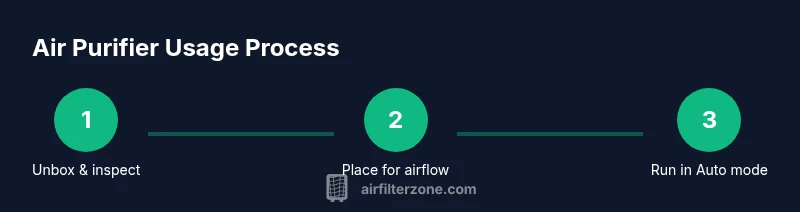
Unbox and inspect the purifier
Remove packaging carefully and verify that all components are present, including the primary filter(s). Look for any shipping damage and ensure the device powers on. If anything seems off, contact the retailer before use.
Tip: Take photos of the unit and contents for your records in case of damage. - 2
Choose placement with airflow in mind
Find a central location with at least 1–2 feet of clearance on all sides. Avoid corners and walls that block intake or exhaust. Position it where air can circulate toward occupied areas like seating or sleeping zones.
Tip: If possible, place the purifier near the pollution source (kitchen, living room) to capture emissions quickly. - 3
Install or verify the filter(s)
Open the unit according to the manual and confirm the filter is seated correctly. Replace disposable filters as needed and reseat pre-filters if applicable. Ensure the seal is tight to prevent bypass air.
Tip: If you’re cleaning a reusable filter, vacuum or rinse as directed and allow full drying before reinstalling. - 4
Connect power and configure modes
Plug the purifier into a grounded outlet and power it on. Select Auto or a desired manual speed; enable Sleep mode if you’ll be in the room overnight. If your model has an air-quality sensor, set it to auto to optimize performance.
Tip: Start with Auto mode so the device learns your space and adjusts accordingly. - 5
Run for an initial calibration period
Let the purifier operate for 20–30 minutes to stabilize airflow and sensor readings before making further adjustments. Listen for changes in fan noise as the unit settles.
Tip: Use a window or door opening to help fresh air mix while the unit calibrates. - 6
Check indicators and adjust
Review the unit’s air-quality indicator or LED display. If the reading remains poor, consider moving the unit to a more central location or increasing the fan speed during peak pollution times.
Tip: Don’t assume low noise means poor performance; the sensor may still be delivering clean air. - 7
Plan regular maintenance
Set reminders for filter changes and exterior cleaning. Keep spare filters accessible and follow the manufacturer's schedule for replacement intervals. Document your maintenance to track consistency.
Tip: Replace filters before airflow noticeably declines or odors return. - 8
Integrate into daily routines
Create a simple daily pattern: run during high-activity periods, keep bedrooms purer at night, and align maintenance with seasonal cleaning. If you have smart features, link the purifier to your routine automation for consistent performance.
Tip: Treat air quality like other home systems—consistent use yields the best results.
FAQ
How often should I replace the air purifier's filter?
Replace filters according to the manufacturer’s guidance and the unit’s indicator. In typical home use, expect to refresh filters when the indicator signals or after several months, depending on air quality and usage. Monitoring the unit helps determine the best schedule.
Check the filter indicator and follow the manufacturer’s replacement schedule. Replace when the indicator lights or as needed based on usage.
Can I run an air purifier at night?
Yes. Most models offer a Sleep or Night mode with quieter operation and dimmed lights. This helps you breathe easier while minimizing sleep disturbance.
Yes—use Sleep mode for quiet, uninterrupted rest while still cleaning the air.
Will an air purifier remove odors?
Purifiers with activated carbon filters help reduce odors and some gases, but effectiveness depends on the source and the filter quality. For persistent smells, improve ventilation and consider a unit with carbon media.
Activated carbon helps with odors, but ventilation is also important.
Do air purifiers remove CO2 from a room?
No. Air purifiers target particulates and some gases, not carbon dioxide. To reduce CO2, increase ventilation or introduce outdoor air exchange.
Air purifiers don’t remove CO2; open a window or use a ventilation system.
Is it safe to use around pets and kids?
Most purifiers are safe when used as directed. Place them out of reach of children and ensure cords are secured. Verify models have safety certifications and stable grills to prevent access to moving parts.
Yes, when placed safely and used as directed.
Can one purifier clean an entire home?
A single purifier typically cannot clean an entire large home. Use multiple units or a dedicated whole-home filtration strategy to cover large spaces more effectively.
One purifier usually isn’t enough for a whole house; multiple units may help.
Watch Video
Quick Summary
- Choose a purifier sized for your space and use Auto mode to optimize performance
- Position the unit for clear airflow and avoid obstructions
- Schedule regular filter maintenance and monitor indicators for best results
- Verify improvements with simple observations or a basic air-quality monitor
- Integrate purification into daily routines for lasting benefits