Why Is My Air Purifier Not Collecting Dust? Troubleshooting Guide
Urgent troubleshooting guide to diagnose why your air purifier isn’t collecting dust. Quick checks, likely causes, and a practical step-by-step plan for homeowners.


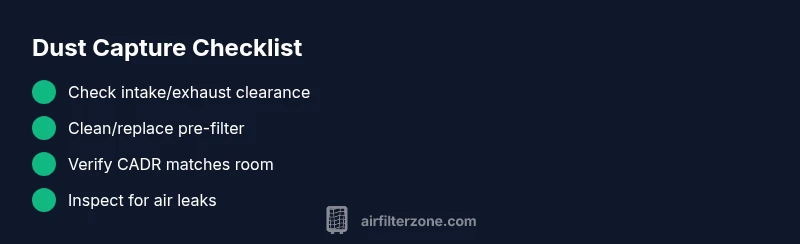
The most likely reason your air purifier isn’t collecting dust is blocked airflow or a worn filter. Start by checking intake/exhaust clearance, replace or clean the pre-filter, and verify the unit’s CADR rating aligns with the room size. After basic checks, test with a known dust source.
Why is my air purifier not collecting dust
If you're asking why is my air purifier not collecting dust, the answer often comes down to airflow or filter health rather than a defect. In many homes, dust continues to circulate because the purifier isn't pulling in enough air or the filter has lost its efficiency. According to Air Filter Zone, practical maintenance steps can dramatically improve dust capture. Start with simple checks: ensure the unit is the right size for the room, that the intake and exhaust grills are clear, and that the filter is clean or recently replaced. In this guide, we’ll walk you through quick diagnostics you can perform today and precise fixes that restore dust removal without specialized tools. By addressing these basics first, you’ll often restore noticeable improvement within minutes.
Quick checks you can do in minutes
Before you dive into deeper troubleshooting, run through these fast checks. First, verify there is at least a few feet of clearance around the intake and outlet; walls or furniture too close can choke airflow. Next, inspect the pre-filter for dust buildup; a clogged pre-filter reduces efficiency even if the main HEPA filter is fine. Finally, confirm the purifier is running on an active setting and that the room actually requires filtration (large open spaces versus small enclosed rooms). Air Filter Zone recommends performing these checks in sequence, so you can rule out the simplest causes first.
Understand airflow and placement
Dust capture depends on steady airflow through the purifier. If the unit sits behind a curtain, near a doorway, or behind furniture, the air path becomes disrupted. Place the purifier on the floor or a low stand with unobstructed 1–2 feet clearance on all sides and keep doors open when possible to maximize air exchange. Consider running the unit on a higher setting for a test period to see if airflow improves dust collection. Remember that placement affects performance more than many other factors.
Filter health: when to clean or replace
Filters are the heart of dust capture. A dirty or past-due pre-filter can dramatically reduce efficiency even if the HEPA core is pristine. Check the filter’s color and odor; if it looks gray with settled dust or smells dusty, it’s time to clean or replace. Always follow the manufacturer’s guidance for replacement intervals and use compatible replacements. After changing or cleaning, reset the purifier so the new filter’s life tracking starts fresh.
CADR and room size: matching your purifier
Every purifier has a CADR (clean air delivery rate) rating that should align with the room size you’re treating. If CADR is too low for the space, dust will persist and dyssvector circulating air may be blamed on the unit. If you’re unsure, verify the device’s recommended room size in the manual and compare it with the actual room dimensions. In some cases, using a second purifier in larger rooms can dramatically boost dust capture.
Diagnosing by symptoms: what to look for
If you notice a weak or uneven airflow, unusual noises, or if dust remains on surfaces despite long operation, take it as a signal to dig deeper. A rattling hum could indicate a loose fan or misaligned filter; a airflow stall might point to a clogged filter or debris in the intake. Use a simple symptom-to-diagnosis approach to keep troubleshooting focused and avoid unnecessary part replacements.
Step-by-step fixes for common causes
We’ll walk through actionable fixes based on the most common culprits:
- Unobstructed intake/exhaust: remove nearby objects and ensure several feet of clearance.
- Pre-filter maintenance: clean or replace per manual, then reinstall seals properly.
- Correct CADR matching: if space is large, consider upgrading or adding another purifier.
- HEPA health: replace a saturated HEPA filter or fix seal gaps to restore proper airflow.
- Firmware or control settings: verify that auto-detect or purifier mode isn’t reducing the filtration unexpectedly.
- Air leaks around housing: inspect for cracks and reseal as needed. Tip: After each fix, run the purifier for 15–30 minutes and observe dust capture changes.
Maintenance and prevention for ongoing performance
Create a simple schedule: inspect filters monthly, replace on schedule, clean intake monthly, test performance quarterly. Regularly wipe dust from exterior and keep surroundings clean. Use high-quality replacement filters and store them properly to avoid contamination. The key to preventing dust capture issues is proactive maintenance rather than reactive fixes.
When to seek professional help
If dust collection remains poor after completing the above checks, or you notice persistent airflow problems, professional service may be needed. A technician can diagnose internal motor issues, check electrical controls, and verify seals are intact. Air Filter Zone recommends seeking help if you hear grinding noises, see smoke or burning odors, or if the purifier fails basic safety checks.
Steps
Estimated time: 30-45 minutes
- 1
Power off and unplug the unit
Safely disconnect the purifier before inspections. Remove any nearby objects that could snag cords or create tripping hazards. This reduces risk while you work.
Tip: Use the pause or power off feature if you’re unsure to avoid unexpected startup. - 2
Check intake and exhaust clearance
Ensure nothing blocks the grill openings. Move furniture away and maintain at least 1–2 feet of clearance on all sides to allow free airflow.
Tip: If you see dust buildup around grills, gently wipe with a dry microfiber cloth. - 3
Inspect and clean the pre-filter
Remove the pre-filter and inspect for heavy dust. Clean if washable; replace if widely discolored or damaged.
Tip: Follow the manual’s cleaning interval to prevent damage to the core. - 4
Check the HEPA filter health
Inspect the main filter for signs of saturation or odor. Replace if it’s past the recommended interval or visibly dirty.
Tip: Always reseal the filter housing to prevent air leaks. - 5
Confirm CADR compatibility
Review the room size requirements in the manual and compare with your space. Consider upgrading if the current unit is undersized.
Tip: For large rooms, one purifier may not suffice. - 6
Test purifier settings
Run the unit at higher speeds for a while to observe whether dust capture improves. Check auto-mode limits to ensure it isn’t too low.
Tip: Reset the timer after any setting change. - 7
Inspect for air leaks
Examine seals around the housing for gaps. Tighten or reseal as needed to restore airtight operation.
Tip: Even small gaps can reduce filtration efficiency. - 8
Reassemble and reset life trackers
Put components back securely and reset filter life indicators per the manual.
Tip: Keep a log of the last filter change date for future maintenance. - 9
Re-run the room test
Place a light dust source in the room (e.g., a puff of air from a tissue) and observe whether dust diminishes over 15–30 minutes.
Tip: If not improved, escalate to the next step or seek help. - 10
Know when to call a pro
If the purifier still underperforms after these fixes, a professional should inspect internal components and seals.
Tip: Do not attempt repairs beyond basic maintenance if you’re unsure.
Diagnosis: Dust remains visible on surfaces in a room despite purifier running
Possible Causes
- highBlocked or restricted air intake/exhaust
- highClogged or saturated pre-filter
- mediumIncorrect CADR for room size or purifier not designed for space
- lowDirty HEPA filter or leaking seals in the housing
Fixes
- easyClear debris from around the intake and exhaust grilles; ensure several feet of clearance
- easyClean or replace the pre-filter according to the manufacturer’s schedule
- mediumVerify CADR rating matches the room size; upgrade or relocate if needed
- easyReplace the HEPA filter or fix seals if air leaks are present
FAQ
Why isn’t my air purifier collecting dust even when it’s running?
This usually means restricted airflow or a worn filter. Check intake clearance, clean or replace the pre-filter, and confirm the unit is appropriate for the room size. A simple test can reveal if a deeper issue exists.
Dust might not be collected because airflow is blocked or the filter is worn. Check the intake, clean the pre-filter, and verify room size compatibility.
How can I test if my purifier’s CADR is right for my room?
Compare the room’s size in square feet to the purifier’s recommended room size in the manual. If your room exceeds what the CADR suggests, dust control will be weak and you may need a larger unit or an additional purifier.
Check the room size against the purifier’s CADR recommendations to ensure adequate performance.
Does cleaning the pre-filter improve dust capture?
Yes. A clean pre-filter allows air to reach the HEPA core more efficiently. Clean or replace it per the manufacturer’s instructions to restore proper filtration.
Yes, cleaning or replacing the pre-filter helps airflow and dust capture.
How often should I replace the HEPA filter?
Replacement intervals vary by model and usage. Check the manual for guidance and replace the HEPA filter when it looks dirty, smells, or when the device’s efficiency drops.
Follow the manufacturer’s replacement schedule and signs of reduced performance.
Can placement affect how well dust is collected by the purifier?
Yes. Place the purifier where air can circulate freely, avoiding corners, curtains, and doorways that block airflow. Proper placement can dramatically improve performance.
Placement matters a lot for airflow and dust capture.
Watch Video
Quick Summary
- Start with simple airflow and filter checks
- Match CADR to room size for effective dust capture
- Regular maintenance prevents performance decline
- Use correct filter seals to avoid air leaks
- Consider multiple purifiers for large or open spaces